
Replacing a legacy Enterprise Resource Planning (ERP) system is necessary when maintenance costs escalate, data silos hinder decision making, and the system can no longer scale with your business. To move safely, organizations must secure executive buy in, conduct a thorough needs assessment, prioritize data cleansing, and execute a phased rollout backed by robust change management.
Upgrading an ERP is not just an IT project; it is a strategic business transformation. While the prospect of migrating away from a deeply entrenched legacy system can be daunting, the operational risks of staying put often outweigh the challenges of moving. Here is a comprehensive guide on how to recognize when your legacy ERP is holding you back and how to execute a safe, successful migration.
Signs It’s Time to Replace Your Legacy ERP
Legacy systems often degrade slowly, making it difficult to pinpoint the exact moment they become a liability. However, several clear indicators suggest it is time for an upgrade.
Escalating Maintenance Costs and Technical Debt
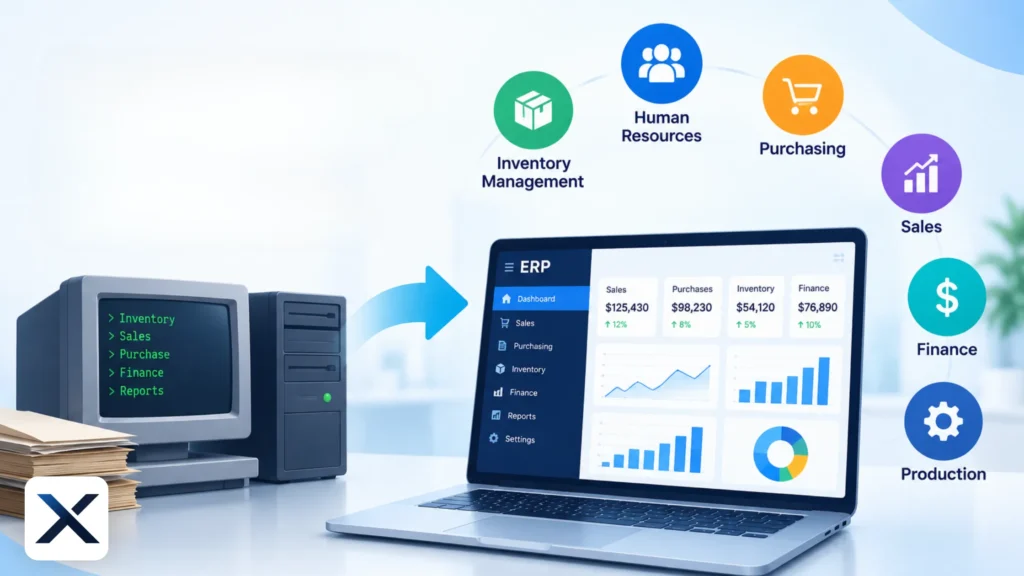
One of the most glaring signs is the rising cost of upkeep. If your IT team spends the majority of their time patching bugs, managing server hardware, or writing custom scripts just to keep the system running, you are accumulating technical debt. Modern cloud-based systems shift the maintenance burden to the vendor, offering predictable subscription costs and automatic updates.
Data Silos and Lack of Real Time Visibility
If your finance team relies on exporting data to spreadsheets to consolidate reports, or if inventory levels are only updated at the end of the day, your ERP is failing its primary purpose. A modern ERP provides a Single Source of Truth (SSOT), offering real time analytics and seamless integration across departments.
Inability to Scale and Support New Business Models
As businesses grow, they often expand internationally, acquire new entities, or adopt new revenue models (like e-commerce or subscriptions). If your current system requires heavy customization to support multiple currencies, new tax regulations, or cross entity consolidation, it has become a bottleneck to growth.
Security Vulnerabilities and Compliance Risks
Legacy systems often lack the advanced security protocols required to defend against modern cyber threats. Furthermore, as data privacy regulations evolve, older systems may lack the built-in compliance tools necessary to avoid hefty fines. If your ERP vendor no longer provides regular security patches, your organization is at severe risk of a data breach.
Justifying the Investment in a New ERP
Before embarking on a migration, leadership must understand the Return on Investment (ROI). The focus should shift from simply replacing software to realizing tangible business benefits. According to academic research on Justifying an ERP Investment, organizations must align the new system’s capabilities with strategic business goals, such as reducing inventory holding costs, accelerating the financial close process, and improving customer satisfaction.
How to Move Safely: A Step by Step Migration Strategy
A successful ERP migration requires meticulous planning. Drawing on Evidence from Successful ERP Implementations, here is a proven framework to minimize risk and ensure a smooth transition.
1. Conduct a Comprehensive Needs Assessment
Before evaluating vendors, document your current pain points and future requirements. Differentiate between “must haves” and “nice to haves.” Consider how industry-specific ERP solutions might address unique regulatory or operational challenges better than generic platforms.
2. Secure Executive Buy in and Build a Cross Functional Team
ERP projects fail when they are treated solely as IT initiatives. Secure active sponsorship from the C-suite (CEO, CFO, COO). Assemble a project team that includes “super users” from every major department finance, HR, supply chain, and sales to ensure the new system meets practical, day to day needs.
3. Choose the Right Deployment Model and Partner
Evaluate whether a cloud, on-premise, or hybrid model suits your organization. Today, most businesses opt for Modern Cloud ERP Platforms due to their scalability, security, and lower upfront infrastructure costs. Furthermore, partnering with experienced ERP migration partners who understand your industry can significantly reduce implementation risks.
4. Prioritize Data Cleansing and Migration
Do not migrate bad data into a new system. Use the transition as an opportunity to audit, cleanse, and standardize your data. Archive historical data that is no longer needed for daily operations and ensure that the data being transferred is accurate, complete, and properly formatted.
5. Implement Phased Rollouts and Rigorous Testing
A “big bang” go live (launching all modules simultaneously) carries immense risk. Instead, consider a phased rollout, deploying core financial modules first, followed by secondary functions. Conduct rigorous User Acceptance Testing (UAT) to identify bugs and workflow issues before the system goes live.
6. Invest in Change Management and Training
The most advanced ERP in the world will fail if employees refuse to use it. Change management is critical. Communicate the benefits of the new system early and often, focusing on how it will make individual jobs easier rather than just how it benefits the company’s bottom line. Provide comprehensive, role-based training to ensure users feel confident navigating the new interface.
Common Pitfalls to Avoid (Critical Failure Factors)
Understanding why ERP projects fail is just as important as knowing how to succeed. A systematic review of ERP failure factors highlights several recurring themes that organizations must avoid:
- Lack of Top Management Support: Without visible leadership, projects lose momentum and funding.
- Inadequate Training: Underestimating the time and resources needed for user training leads to low adoption rates.
- Over-Customization: Modifying the new ERP to mimic the old legacy processes defeats the purpose of the upgrade. Organizations should adapt their processes to the software’s best practices, not the other way around.
- Poor Project Management: Unrealistic timelines and scope creep are notorious critical failure factors in ERP implementation.
By staying informed through the latest ERP migration insights, organizations can proactively navigate these challenges and ensure a high return on their technology investment.
Frequently Asked Questions (FAQ)
Depending on the size of the organization and the complexity of the requirements, an ERP migration can take anywhere from 6 to 18 months. Phased rollouts can help deliver value incrementally during this period.
Generally, no. It is highly recommended to adopt the standard, out-of-the-box best practices built into modern ERPs. Over-customization increases implementation time, complicates future upgrades, and adds technical debt.
Cloud ERP is hosted on the vendor’s servers and accessed via the internet, typically on a subscription basis, with updates managed by the vendor. On-Premise ERP is installed locally on a company’s own hardware, requiring internal IT staff for maintenance, security, and upgrades.
It is best practice to migrate only active, essential data (e.g., open AR/AP, current inventory, active customers) to the new system. Historical data can be stored in a separate, accessible data warehouse or legacy archive for compliance and reporting purposes.