
ERP projects rarely fail because of bad software; they fail due to critical disconnects in organizational readiness, change management, data migration, and post go live support. By proactively identifying and bridging the 8 gaps between selection, implementation, and support, businesses can avoid costly overruns, ensure high user adoption, and achieve the true ROI of their enterprise resource planning investment.
Introduction
Enterprise Resource Planning (ERP) systems act as the central nervous system of modern businesses. By breaking down data silos, they integrate everything from finance and human resources to supply chain management and manufacturing into a single, unified source of truth. However, the journey from selecting a platform to fully integrating it into daily operations is fraught with risk. Industry data consistently shows that a staggering 50% to 75% of ERP implementations fail to meet their original objectives, run over budget, or miss deadlines.
Why is the failure rate so high? The answer lies in the transitional phases of the project. Organizations often treat an ERP rollout as a simple IT upgrade rather than a comprehensive business transformation. This fundamental misunderstanding creates massive gaps between what was promised during the software selection phase, what is actually built during implementation, and how the system is maintained during long term support.
The High Cost of ERP Failure
When an ERP project collapses, the fallout extends far beyond the IT department. It disrupts supply chains, delays financial reporting, damages customer relationships, and frustrates employees. History is littered with Notable ERP Implementation Failures, from retail giants losing millions in unmanaged inventory to public sector disasters.
A prime example is the Botched Oracle Project at Birmingham City Council, which ballooned in costs and required years of auditing and millions of pounds to rectify due to inadequate planning, shifting design requests, and poor project oversight. To avoid becoming a cautionary tale, organizations must understand and address the following eight critical gaps.
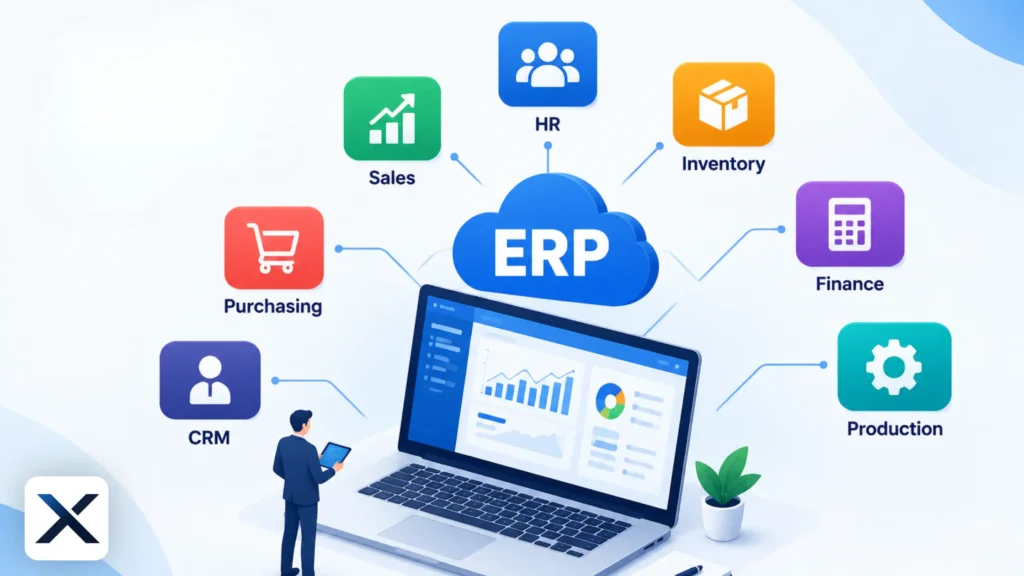
The 8 Critical Gaps in ERP Projects
Gap 1: Misaligned Selection and Business Requirements (The Selection Gap)
Many organizations choose an ERP based on flashy vendor demos rather than their own documented business processes. This creates a massive gap between what the software does out of the box and what the business actually needs. When companies fail to define their functional requirements clearly, they end up purchasing a system that doesn’t fit their operational reality.
- The Fix: Before evaluating Modern Cloud ERP Solutions, conduct a thorough internal audit. Document your current workflows, identify pain points, and create a defensible ERP selection criteria framework.
Gap 2: Lack of Executive Sponsorship and Governance (The Leadership Gap)
An ERP rollout is a business transformation, not just an IT project. When C-suite executives delegate the project entirely to the IT department and fail to resolve cross departmental conflicts, governance breaks down. Without strong leadership, departments will fight to keep their legacy processes, leading to scope creep and budget overruns.
- The Fix: Ensure active, visible executive sponsorship. Leaders must be willing to make tough decisions, enforce standardization, and drive the project forward.
Gap 3: Poor Data Quality and Migration Strategy (The Data Gap)
“Garbage in, garbage out.” Migrating dirty, duplicated, or outdated legacy data into a pristine new system is a primary cause of go-live failures. Companies often underestimate the time and effort required to map and cleanse data, leaving it until the last minute.
- The Fix: Treat data cleansing as a dedicated project phase long before migration begins. Assign data owners to validate the accuracy of master data, such as customer records, inventory counts, and financial balances.
Gap 4: Inadequate Change Management and User Adoption (The Human Gap)
Software doesn’t generate ROI; people using the software do. Ignoring the human element is a fatal flaw. If you want to understand why do ERP implementations fail at the user level, look no further than poor communication and resistance to change. Employees who feel the new system is being forced upon them will find workarounds or refuse to use it altogether.
- The Fix: Invest heavily in Organizational Change Management (OCM). Communicate the “why” behind the project, involve end users early in the design phase, and build a network of internal champions to advocate for the new system.
Gap 5: Over-Customization vs. Standard Processes (The Design Gap)
Instead of adapting their workflows to the ERP’s built in best practices, companies often spend millions customizing the software to mimic their old, inefficient legacy processes. This not only inflates implementation costs but also makes future system upgrades a nightmare.
- The Fix: Adopt standard, out-of-the-box processes wherever possible. Reserve customizations only for processes that provide a genuine competitive advantage.
Gap 6: Insufficient Testing and Training (The Execution Gap)
Rushing through User Acceptance Testing (UAT) or providing generic, last-minute training leaves employees unprepared for day one. If users don’t know how to execute their daily tasks in the new system, operations will grind to a halt immediately after go-live.
- The Fix: Conduct rigorous, role-based testing using real-world scenarios. Provide continuous, hands-on training tailored to specific job functions, and ensure users must pass competency checks before gaining access to the live system.
Gap 7: The “Go-Live” Cliff (The Support Gap)
Many companies treat “go-live” as the finish line. When the external implementation team leaves, the internal support desk is often overwhelmed by tickets. If small issues go unresolved, users become frustrated, and the system’s integrity begins to degrade.
- The Fix: Establish a robust post-go-live support structure. Retain key members of the implementation team for a hypercare period, and ensure a smooth knowledge transfer to your internal IT helpdesk.
Gap 8: Failure to Measure ROI and Continuous Improvement (The Value Gap)
Once the system is stable, organizations often fail to audit whether the ERP is actually delivering the promised business value. Academic research on ERP critical success factors emphasizes that post-implementation evaluation is essential for long-term success. Without measurement, you cannot optimize.
- The Fix: Define Key Performance Indicators (KPIs) early in the project. Schedule regular post-implementation audits to measure ROI, identify underutilized features, and continuously improve processes.
How to Bridge the Gaps for ERP Success
Successfully navigating an ERP project requires a holistic approach that balances technology, processes, and people.
- Partner Wisely: Work with experienced consultants and implementation partners who understand your industry and will challenge your assumptions. A good partner won’t just install software; they will guide your business transformation.
- Prioritize People: Never underestimate the power of change management. A technically perfect system will still fail if users reject it. Build a culture of adaptability and continuous learning.
- Phase the Rollout: Consider a phased implementation approach rather than a risky “big bang” launch. Rolling out modules or locations sequentially allows you to learn from mistakes, refine your training, and build momentum.
- Enforce Data Governance: Establish strict data entry and maintenance protocols early on. Clean data is the lifeblood of any ERP system, and maintaining its integrity requires ongoing vigilance.
Frequently Asked Questions (FAQ)
The primary reason ERP projects fail is a lack of organizational change management and executive sponsorship, rather than technical flaws in the software itself. When businesses fail to align their people and processes with the new technology, adoption plummets.
Depending on the size of the organization, the complexity of the system, and the scope of the project, a typical ERP implementation can take anywhere from 6 months to over 2 years.
Start auditing and cleansing your legacy data immediately. Do not wait until the implementation phase to decide what data is accurate. Assign dedicated data owners to ensure only clean, relevant data is moved to the new system.